
LED lights run far cooler than incandescent and halogen lamps - certified LED lighting produces only about a quarter of the heat of a comparable incandescent bulb - but they still generate heat, and managing that heat is what keeps them bright and reliable. The key to reducing heat from LED lights is not to trap or block it, but to move heat away from the LED chips, the driver, and the fixture body as efficiently as possible. In practice, you reduce LED overheating by improving airflow, sizing the heat sink correctly, matching the LED driver to the load, avoiding overdriving, and choosing fixtures rated for the ambient temperature where they actually run. For high-power commercial and industrial fixtures - high bay lights, flood lights, area lights - thermal design has to be decided before installation, not after a driver fails or the light output starts to fade.
The guidance below reflects how commercial and industrial LED fixtures are specified in the field, where long operating hours and high ambient temperatures turn thermal design into a purchasing decision rather than an afterthought. Wherever a number or claim matters, it is tied to a manufacturer rating or a published source rather than to feel.
Why Do LED Lights Get Hot?
LEDs convert electricity into light efficiently, but a significant share of the input power still leaves the chip as heat instead of light. Unlike an incandescent filament, an LED does not radiate most of that heat away as infrared; it has to be conducted out of the package through the fixture. That is why quality LED fixtures use aluminum housings, finned backs, and metal-core circuit boards. Those parts are not just structural - they are the path that carries heat away from the chip and protects both the LED and the driver.
A well-designed fixture moves heat through several stages:
- From the LED chip to its substrate
- From the substrate to the printed circuit board, often a metal-core PCB on high-power products
- From the PCB to the heat sink or the fixture body
- From the heat sink into the surrounding air
This chain is the fixture's thermal path. If any link is weak, blocked, undersized, or poorly assembled, the chip runs hotter than intended and the whole fixture pays for it in brightness and lifespan. Getting the thermal design of an LED fixture right is therefore more important than headline wattage or lumen figures.

Is It Normal for LED Lights to Get Hot?
Yes - many LED lights are warm or even hot on the housing during normal operation, especially high-power bulbs, downlights, high bay lights, flood lights, and dense LED strip. A warm metal heat sink usually means it is doing its job: pulling heat off the chips and shedding it to the air.
The temperature you can feel is not the temperature that matters most. The LED junction inside is hotter than the surface, and it is junction temperature - not case temperature - that drives how quickly light output fades and color shifts over time. Manufacturers specify rated life at a given junction temperature, which is why two fixtures that feel equally warm can behave very differently. Trust the rated operating temperature on the spec sheet over what your hand tells you.
Heat only becomes a problem when it crosses from "warm" to clearly abnormal: a fixture too hot to touch for more than a moment, flickering or dimming under load, visible discoloration, a burnt or chemical smell, or repeated early failures. Those signals are covered in the safety section below.
Causes of LED Overheating vs. How to Fix Them
Most LED heat problems trace back to a short list of causes, and each has a direct fix.
| Cause of overheating | How to fix it |
|---|---|
| Trapped air in a sealed, recessed, or decorative housing | Improve ventilation or use a fixture rated for the enclosure |
| Undersized or dust-clogged heat sink | Choose a larger finned heat sink for the wattage; keep fins clean |
| Wrong or overloaded LED driver | Match driver type, voltage, and current to the LED module |
| Overdriving the LEDs for extra brightness | Stay within rated current; step up to a higher-output fixture instead |
| High ambient temperature at the mounting point | Use high-temperature-rated fixtures and improve room airflow |
| Poor thermal contact between board and heat sink | Apply thermal interface material correctly and mount with even contact |
| Low-quality fixture with a thin housing and weak driver | Specify by thermal design and rating, not by price or wattage alone |

How to Reduce Heat From LED Lights: Seven Methods
1. Improve Airflow Around the Fixture
Heat cannot leave a fixture if the surrounding air is trapped. Overheating often starts when an LED is installed in a tight cavity, a sealed glass globe, or a decorative housing originally built for a hotter, less heat-sensitive lamp. Keep ventilation openings clear, leave clearance around high-power fixtures, and keep dust, oil, and debris off the heat sink fins - a clogged fin stack behaves like an undersized one. In warehouses, factories, gyms, and parking areas where fixtures run long hours, plan for the airflow they will actually have, not the airflow of an empty test bench.
2. Use a Properly Sized LED Heat Sink
A heat sink absorbs heat from the board and releases it to the air. What it needs is surface area, a conductive material, fin spacing that lets air move rather than trapping dust, and solid mechanical contact. Aluminum dominates here because it balances conductivity, weight, corrosion resistance, and cost - but the form matters as much as the metal. Extruded fins, die-cast bodies, and surface finish all change real-world performance, and a heat sink that performs well in still air can lose ground when mounting orientation works against natural convection.
For a high-power LED module, a dedicated heat sink or a metal fixture body is essential. For LED strip, an aluminum channel acts as a simple heat sink and spreads heat off the tape - which is why strip mounted on bare wood or plastic runs noticeably hotter than the same strip in an aluminum profile.
3. Match the LED Driver - and Check Its Temperature
The driver deserves as much attention as the chips. Because the electrolytic capacitors in many drivers are sensitive to heat, the driver is often one of the first parts of a fixture to fail when thermal management is poor. Use the correct constant-current or constant-voltage driver for the module, match its output to the load, and confirm its rated case temperature - the Tc point - is comfortable for the environment.
Drivers run into trouble when they are sealed in a hot junction box, mounted against another heat source, pushed past their ambient rating, or simply run for long hours at the edge of their limits. On recessed lights, panel lights, high bay lights, and outdoor flood lights, confirm the driver has ventilation and that its temperature rating fits the real installed conditions, not the catalog ideal.
4. Don't Overdrive the LEDs
Pushing more current through an LED raises both brightness and junction temperature, and sustained high junction temperature is one of the main reasons output fades early. Overdriving shows up most in DIY builds, bargain modules, and installations where the driver was never properly matched to the load. Stay within rated wattage and current, avoid incompatible dimmers, and don't modify a fixture unless the change has been tested. If you need more light, a higher-quality, higher-output fixture is almost always a better answer than forcing a small one past its limits - overdriving is one of the quickest ways to shorten an LED's usable life.
5. Manage the Ambient Temperature
An LED fixture never operates in isolation. The same product behaves very differently in a cool office ceiling than in a hot warehouse, foundry, commercial kitchen, or sealed enclosure, because higher ambient temperature reduces how fast heat can leave the fixture. Keep fixtures away from ovens, steam lines, and hot machinery, improve room ventilation where you can, and avoid burying drivers in unventilated cavities.
Most important, match the rating to the worst expected condition. Many commercial and industrial fixtures are rated for ambient temperatures up to roughly 40–50°C, with high-temperature models rated higher; some manufacturers publish a derating curve showing reduced output or shortened life as ambient rises. For hot installations, choosing high-temperature-rated high bay and area fixtures is safer and cheaper over time than trying to add cooling to a standard fixture.
6. Apply Thermal Interface Materials Correctly
Thermal interface materials - paste, pads, adhesives, or phase-change films - fill the microscopic air gaps between a board and a heat sink. Air is a poor conductor, so even two polished metal surfaces transfer heat poorly without help. The goal is a thin, even layer that improves contact; a thick or uneven application actually adds thermal resistance. TIMs matter most on high-power modules, COB assemblies, boards bolted to aluminum housings, and any build where the board-to-heat-sink joint carries the full thermal load.
7. Upgrade to a Fixture Engineered for the Conditions
Sometimes the installation is fine and the fixture is the problem. Low-cost products often pair an undersized heat sink with a thin housing, a weak driver, and basic board materials. They may light up fine on day one and then dim, flicker, or fail because the heat has nowhere to go. A fixture built for demanding use should combine a thermally conductive housing, a heat sink or integrated cooling structure suited to the wattage, a driver with thermal protection, a metal-core PCB on high-power models, adequate spacing between chips, and a clearly stated operating temperature range. For hot or high-bay locations, specify a product designed for that environment rather than asking a standard fixture to survive it.
Residential vs. Commercial vs. Industrial: Matching the Solution to the Application
The right fix depends heavily on where the light lives. Treating a hot warehouse like a living room - or over-engineering a bedroom lamp - both waste money.
| Environment | Typical fixtures | Main heat risk | What to prioritize |
|---|---|---|---|
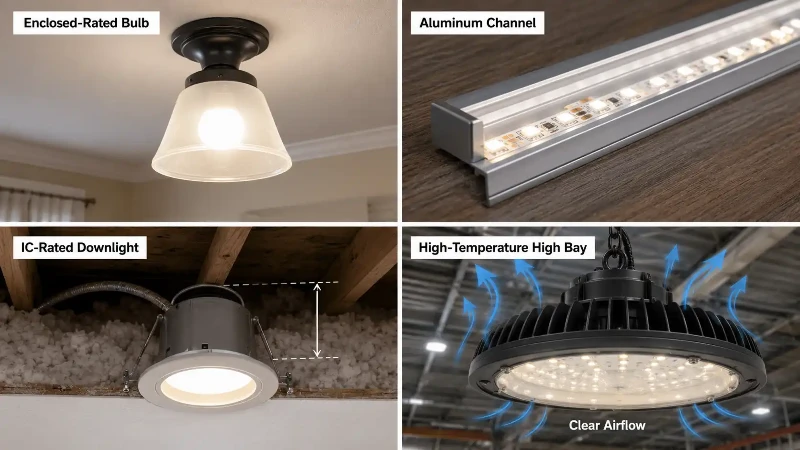
| Residential | Bulbs, downlights, strip, small panels | Enclosed fixtures and insulation contact | Enclosed-rated bulbs, IC-rated recessed cans, basic ventilation |
| Commercial | Troffers, downlights, area and parking lights | Long run hours and ceiling cavity heat | Driver quality, ambient rating, clean access for maintenance |
| Industrial / high-ambient | High bay, flood, tri-proof, hazardous-area | High wattage, heat near the roof, harsh conditions | High-temperature ratings, robust aluminum bodies, IP rating, listed safety |
How to Reduce Heat in Specific LED Applications
LED Bulbs in Enclosed Fixtures
Bulb overheating most often happens inside a fully enclosed fixture. Not every LED bulb is rated for that use, and a sealed globe traps heat the bulb was meant to shed into open air. The U.S. Department of Energy notes that fully enclosed fixtures trap heat and can shorten the life of certain LED products, so the spec sheet should be checked before installing. Use an enclosed-rated bulb where the fixture is sealed, stay within the fixture's wattage rating, keep lamps away from other heat sources, and step down in wattage if a cooler-running option will do.
LED Strip Lights
Strip runs hot when chip density and wattage per meter are high or when it is stuck to a surface that cannot move heat. A flexible strip pressed onto wood, plastic, or fabric has almost no way to dissipate heat, while the same strip in an aluminum channel runs cooler and lasts longer. Mount higher-output strip on aluminum profiles, size the power supply correctly, avoid overloading a single run, never power a strip while it is still coiled, and leave room for air around the installation. Aluminum channels improve the look of a job, but their real value is thermal.
Recessed LED Downlights
Recessed downlights are sensitive to what sits above the ceiling. Heat builds in tight cavities, and the wrong choice around insulation is a common cause of early failure. Use IC-rated fixtures wherever insulation will contact the housing, keep non-IC fixtures clear of insulation, place the driver where it can breathe, and avoid cramming high-output downlights into small sealed pockets. When in doubt, follow the manufacturer's instructions and local electrical code.
LED High Bay Lights
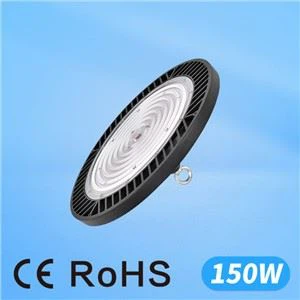
High bay fixtures run at high wattage for long hours in warehouses, factories, gyms, and workshops, so thermal design is critical. Choose a robust aluminum body, confirm the ambient rating, keep the fins clean, and avoid mounting directly above hot machinery. One detail catches many installers off guard: in tall buildings, heat stratifies and the air at fixture height near the roof can be considerably hotter than the air at floor level, so the ambient temperature that matters is the one up at the fixture. For hot facilities, use high-temperature LED high bay lights rated for that condition rather than a standard model.
Outdoor LED Flood Lights
Outdoor floods face sun, rain, dust, and swinging temperatures. A fixture can carry an outdoor rating and still overheat if the heat sink is blocked or it is mounted flush against a heat-trapping surface. Keep the back of the housing open to air, avoid surfaces that bake in direct sun, clean debris off the fins, and confirm the fixture carries proper ingress and temperature ratings. The balance to watch is that waterproofing and heat dissipation pull in opposite directions: a sealed body still has to shed heat through its housing, so a well-designed outdoor LED flood light manages both at once.
When LED Heat Becomes Unsafe
Most LED heat is harmless. A few signs are not, and they call for action rather than tolerance. A burnt or fishy smell, browned or melted plastic, scorch marks around the base or socket, a driver that repeatedly shuts down or trips a breaker, or a housing that has become too hot to touch all mean the fixture has crossed a line. Disconnect power before inspecting, and treat the rated operating temperature on the spec sheet as the real limit - not your sense of how warm it feels.
| Symptom | Likely cause | Safe action | Repair or replace? |
|---|---|---|---|
| Slightly warm housing | Normal operation | None needed | Keep using |
| Hot but stable metal heat sink | Often normal on high-power LEDs | Check against the rated temperature | Keep using if within rating |
| Flickering or dimming under load | Driver stress or overheating | Check driver, supply, and dimmer match | Repair the driver or replace |
| Discoloration of housing or diffuser | Sustained excess heat | Reduce heat load or improve airflow | Often replace |
| Burnt smell or scorch marks | Unsafe overheating | Cut power and inspect immediately | Replace |
| Repeated early failure | Thermal design mismatch | Re-spec for the environment | Replace with a better-rated fixture |
A few things should never be part of cooling an overheating fixture:
- Do not pour water on or aim a fan into an electrical fixture that is overheating; deal with the wiring and the rating, not the symptom.
- Do not open, drill, or modify a sealed or rated housing to "let heat out" - you void the rating and may break its safety protection.
- Do not bypass or defeat a driver's thermal protection to stop nuisance shutdowns.
- Do not run a non-dimmable LED on an incompatible dimmer, which can overheat the driver.
- Do not bury a non-IC-rated recessed fixture in insulation.
- Do not keep using a fixture that smells burnt or shows scorching; disconnect it and follow local electrical code.
FAQ
Q: Why do LED lights get hot?
A: Some of the power into an LED becomes heat rather than light, and that heat has to be conducted out through the board, heat sink, and housing. Poor airflow, an undersized heat sink, the wrong driver, or a high ambient temperature all make the chip run hotter than intended.
Q: Is it normal for an LED light to be hot to the touch?
A: A warm or hot metal heat sink can be perfectly normal, especially on high-power fixtures. A burnt smell, flickering, discoloration, or extremely hot plastic is not normal - cut power and inspect the fixture.
Q: Can LED bulbs overheat in enclosed fixtures?
A: Yes. A sealed fixture traps heat the bulb is designed to shed into open air, which can shorten its life. Use a bulb specifically rated for enclosed fixtures, and check the packaging or spec sheet before installing.
Q: What temperature is too hot for an LED light?
A: There is no single number, because it depends on the product. The practical answer is the manufacturer's rated operating temperature: if the ambient at the mounting point approaches or exceeds that rating, the fixture is being pushed too hard. Use the spec sheet rather than judging by hand.
Q: Why does my LED driver get hot?
A: Drivers heat up when they sit in a sealed space, mount near another heat source, run past their rated ambient, or are low quality or mismatched to the load. Since heat-sensitive capacitors often fail first, confirm the driver has ventilation and that its case temperature rating fits the environment.
Q: Do LED strip lights need aluminum channels?
A: Higher-output strip benefits a great deal from an aluminum channel, which spreads and dissipates heat off the tape. Strip stuck to wood, plastic, or fabric can overheat and fail early, so aluminum profiles are strongly recommended for anything above low power.
Q: How do I cool down LED strip lights?
A: Mount the strip on an aluminum channel, use a correctly sized power supply, avoid overloading long runs, keep air around the installation, and choose a lower-density or lower-wattage strip when full output is not required.
Q: What LED lights are best for high-temperature areas?
A: Look for fixtures with a high rated operating temperature, a robust aluminum body, a heat sink sized for the wattage, and a driver with thermal protection. High-temperature-rated high bay and flood fixtures are designed for hot warehouses, factories, and outdoor sites where standard products would struggle.
Q: Does heat shorten LED lifespan?
A: Yes. Sustained high junction temperature accelerates how quickly light output fades and color shifts, and it is hard on the driver. Keeping the chip and driver within their rated temperatures is the single biggest factor in getting the rated life out of a fixture.
Choosing Fixtures That Stay Cool
Reducing heat from LED lights comes down to one idea: give the heat a clear path out and never ask a fixture to work beyond what its rating allows. For a small residential light, that can be as simple as the right enclosed-rated bulb or a little more ventilation. For strip, an aluminum channel does most of the work. For commercial and industrial lighting, the reliable approach is to specify for the environment from the start.
A short selection sequence covers most projects: identify the real ambient temperature at the mounting height, confirm the fixture's rating and any derating cover it, check the driver's case temperature and protection, verify the housing and heat sink suit the wattage, confirm the IP rating fits without choking heat dissipation, and check the safety listings the site requires. Factor in daily operating hours, because a fixture running around the clock lives a harder thermal life than one used a few hours a day. Specify against that full picture, and an LED system will deliver the light you need while keeping heat under control across its service life.